CASEPOP JOURNAL / PHOTO DIY
Turn a Handwritten Recipe Into a Phone Case
Custom phone case · $35 at publication
Open DIY Studio →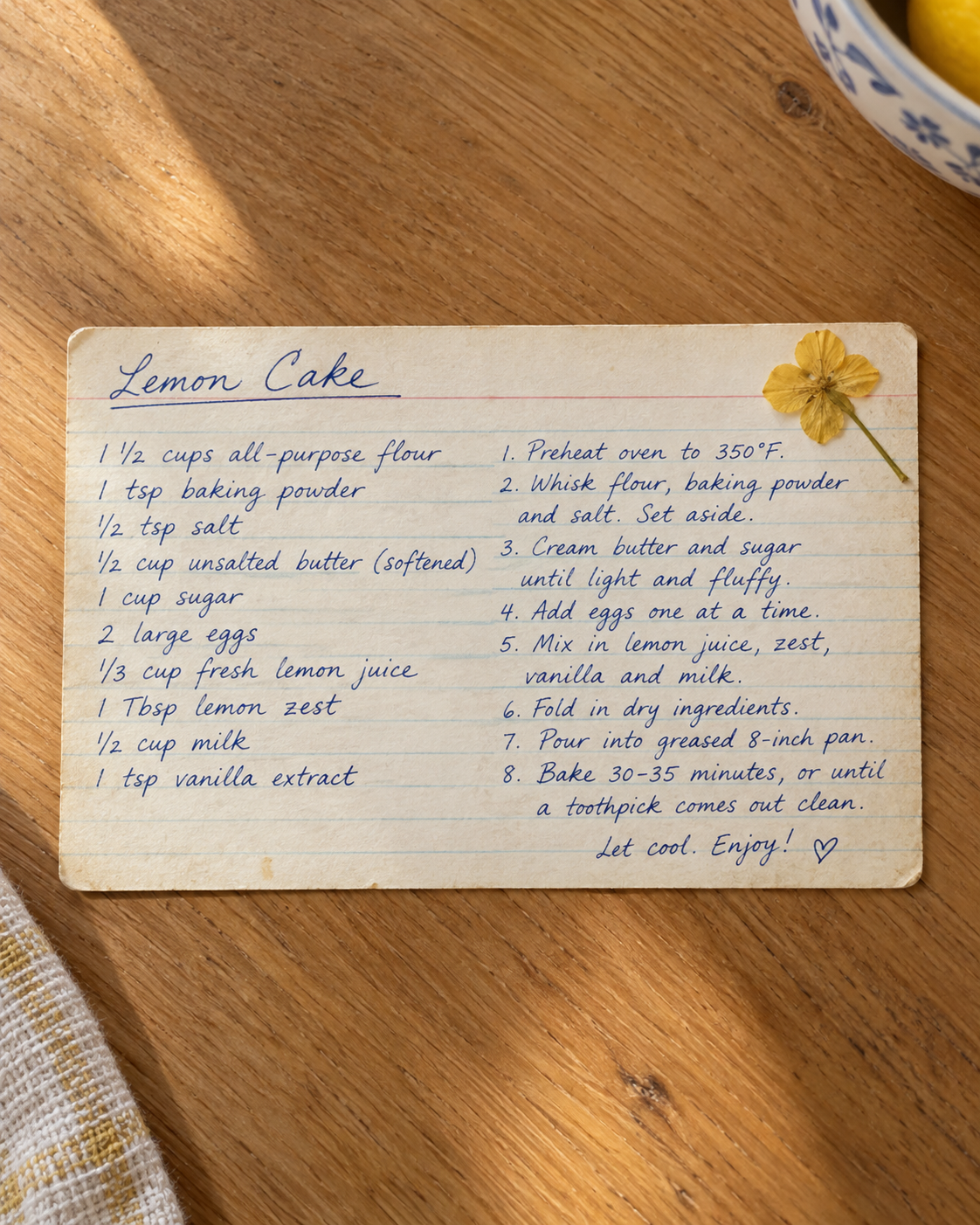
The short answer: photograph the recipe card straight on in soft, even light, then decide whether the paper itself or one piece of handwriting is the memory you want to carry. Upload that clean image, select the exact phone model, and use the editor preview to keep the title and any meaningful note away from the camera area and outer edges.
A handwritten recipe phone case can preserve more than ingredients. The slant of a letter, a correction in the margin or a small “enjoy” at the bottom may be the detail that makes the image personal. The challenge is shape: recipe cards are often wide, while phone cases are tall. Trying to show every line can make all of the writing too small. A better design starts by choosing what needs to remain recognizable.
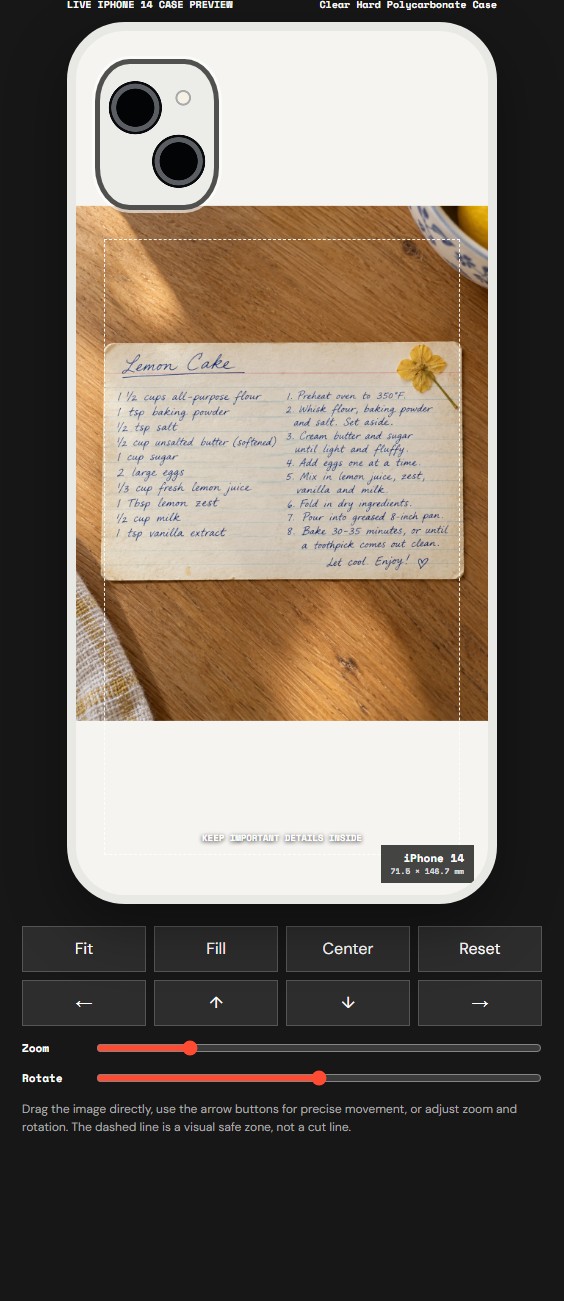
The example above uses a fictional recipe-card photo created for this studio demonstration. It contains no customer image or private family information. The second image is a real CasePop editor screenshot using iPhone 14, Clear Hard Polycarbonate Case and Manual Adjust with Fit. It is a placement preview, not proof of a printed result, color match or material performance.
First, choose what the keepsake is really about
There are two useful approaches. Keep the full card when its paper color, worn corners and layout are part of the story. Crop closer when one heading, handwritten note or signature matters more than the ingredient list. On a small case, one readable fragment can feel more intentional than a complete document reduced until no line is easy to recognize.
Before photographing anything, ask permission from the person who owns the card or the family members who share it. Make a private copy for yourself, and remove names, addresses, phone numbers or other details you would not want visible in public. The CasePop example is fictional for exactly that reason. Your design should use a photo and handwriting you own or have permission to print.
Photograph the card like a document, not a dinner scene
Place the recipe on a flat surface near a window, out of direct sun. Hold the camera parallel to the card so one side does not appear wider than the other. Tap the handwriting to focus, keep the phone steady and take several versions. Avoid a strong ceiling light that produces glare on laminated paper or deep shadows across faint pencil.
Use the original camera file rather than a screenshot from a message thread. A messaging screenshot can add interface marks and may reduce the useful image area. Save one untouched copy, then edit a duplicate. Straighten the card, crop distracting table space and make a modest contrast adjustment if the ink is pale. Do not sharpen so aggressively that the paper texture becomes a noisy pattern around the letters.
If the title and final note matter most, try a second crop that includes only those sections. You can compare both files in the editor without changing the original. The current studio accepts one image for each design; it does not transcribe handwriting or rebuild faded letters as editable text.
Use Fit to understand the full-card tradeoff
In Manual Adjust, Fit is a practical first check because it shows the entire rectangular image. In our iPhone 14 preview, Fit keeps the complete recipe card visible, but it also keeps part of the wooden background and leaves unused case space. The writing becomes smaller because a wide card has to fit inside a narrow case.
Fill covers more of the case and may crop the image. Center, movement controls, zoom and rotation help refine placement, but none of them can decide which sentence deserves priority. If the full recipe is too small, return to your photo library and create a tighter crop around the handwriting you care about. That is usually clearer than pushing zoom until important words fall outside the visible area.
Protect the camera area and the handwriting you value
Select the exact phone model before trusting the composition. Camera openings differ, and a layout made for one phone should not be assumed to fit another. The dashed safe-zone guide in the editor is a visual aid, not a literal cut line or production guarantee. Keep the recipe title, signature and distinctive notes comfortably inside it, then inspect all four edges.
A useful order is: choose the material, choose the full model name, upload the image, start with Fit, and move or crop only after the camera area is visible. If a handwritten line sits directly under the camera opening, reposition the image or make another source crop. Do not choose a nearby phone model simply because its preview looks convenient.
Check the current options and price before paying
At publication, the CasePop studio showed a $35 phone-case price and listed Clear Hard Polycarbonate Case and Clear Flexible TPU Case as two available material labels. Those names identify choices in the live selector; they do not by themselves prove a particular feel, color result, protection rating, anti-yellowing claim or charging compatibility.
Use the preview to review placement, then confirm the selected model, material, quantity and price in the bag. If the handwriting must reproduce in a particular way, ask the studio by email before ordering. Review the current shipping and returns pages as part of the same decision.
A simple recipe-photo checklist
- Confirm permission to use and print the handwriting.
- Remove private information before creating a public or gift design.
- Photograph the card straight, evenly lit and in focus.
- Keep the original file and edit a duplicate.
- Choose whether the whole card or one meaningful passage should lead.
- Select the exact phone model before adjusting the crop.
- Check the camera area, outer edges, material, price and bag summary.
Open CasePop DIY Studio and preview your recipe photo →
Questions before you start
Should I upload the whole recipe card or crop the handwriting?Use the whole card when its worn edges and paper are part of the memory. Crop closer when one title, note or signature matters more than showing every ingredient.
Can the CasePop editor make faint handwriting clearer?The current editor places, scales and rotates one image; it does not restore faint ink or transcribe handwriting. Improve contrast in a copy of the photo before uploading, while keeping the original file unchanged.
Will every line of a landscape recipe be readable on a phone case?Not necessarily. A tall phone case gives a landscape card limited width, so small writing can become difficult to read. Check the preview and prioritize the most meaningful details.
How much is the custom phone case shown here?The CasePop studio showed $35 for a custom phone case when this guide was published. Check the live editor and order summary before paying because available options can change.