Keep the drawing. Lose the distractions.
A sketchbook doodle, a little abstract painting or a handwritten word can make a good case design without becoming a complicated project. Start by deciding what belongs to the artwork. Uneven brush texture may be intentional; the shadow from your phone probably is not. That distinction is more useful than smoothing every imperfect edge.
The CasePop artwork case service uses the same $35 workflow as a photo case. Upload one image, choose an available case and exact phone model, then arrange it yourself or choose Studio Arrange for layout help. It is separate from the $25 plate-text service, which personalizes the existing license-plate collage rather than using your uploaded drawing.
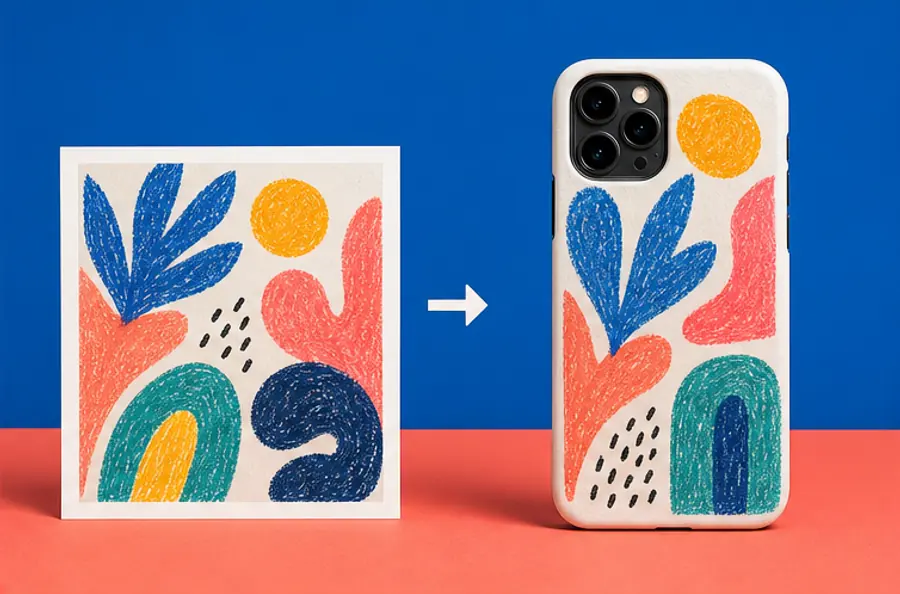
Photograph the page square-on
Place the drawing flat in even light. Hold the phone parallel to the page so the top does not look narrower than the bottom. Move yourself or the light if your hand casts a shadow across the artwork. Take a few photographs and compare the corners: a frame that starts straight gives you more freedom later.
A scanner is another option if you have one. Work from the original file rather than a screenshot of a messaging app. Crop away the table and unrelated sketchbook notes, but leave a little space around the marks you want to keep. Save a separate edited copy so the original remains available.
Decide whether the paper is part of the design
Cream paper, pencil shading and the grain of a painted page can make a drawing feel tactile. Keeping that background is a deliberate choice. In this version, you are placing a picture of the artwork on the case, background included.
A transparent PNG lets the marks stand on their own instead of sitting inside a photographed rectangle. Saving a JPG as a PNG does not remove its background. If you have a clean transparent file, use it; otherwise ask for studio help and explain whether you want the paper retained. Do not rely on automatic white-background cleanup to understand pale watercolor or a faint pencil line.
Let the strongest mark set the size
Reduce the image on your screen until it is roughly the size of your phone. What do you notice first? If it is a confident red shape, build the layout around it. If the drawing only makes sense when you zoom in, consider a closer crop or a simpler selection from the page.
Thin handwriting needs particular care. A whole handwritten letter may turn into texture, while one short phrase can remain readable. Keep the spacing around letters rather than stretching the image to make it taller. For several sketches, prepare your arrangement as one finished image before uploading; the current upload flow takes one file, not separate editable layers.
Start with Fit, then decide what can be cropped
For lettering or a complete drawing, Fit is a sensible starting point because it keeps the whole image visible. Fill enlarges the image to cover the case and can trim the edges. Neither setting knows which tiny mark matters most to you. Select your exact model first, then inspect the camera opening and outer edges while you drag or resize.
An abstract color field can lose an edge without losing its meaning. A signature cannot. Give the studio a specific note such as “keep the full word and the small star below it” rather than “make it perfect.” Use the preview to judge placement, not as a promise of an exact match between a glowing screen and the printed surface.
A small file check before you order
Use a PNG, JPG or WebP up to 12 MB. An original image at least 1500 pixels on its shortest side is recommended, not a payment requirement. Increasing a small file's pixel dimensions does not restore missing detail. The image preparation guide explains the practical checks.
Standard shipping to eligible U.S. addresses is free and applicable sales tax is included. Review the custom-order return conditions; personalized items do not have the same change-of-mind options as eligible ready-made cases. Upload artwork you own or are allowed to reproduce. When your file and model are ready, open DIY Studio and start with your drawing.
Before you upload
Can I use a drawing instead of a photograph?
Yes. CasePop's $35 photo-artwork service accepts one PNG, JPG or WebP image, up to 12 MB. Photograph or scan your drawing, then upload the resulting image in DIY Studio.
Will the white paper disappear automatically?
Do not assume it will. Prepare a transparent PNG if you want artwork without a background, or ask the studio for help. Check the preview before ordering.
Should I choose Fit or Fill for a drawing?
Start with Fit if every line or letter needs to remain visible. Fill covers the case area and may crop the edges. Check the selected phone model's camera opening.