No sign-up step
Choose your case and proceed without creating a CasePop password.
Use an accessible email
Delivery updates and order verification depend on the contact details you provide.
Start with a case, not a registration form
If you are visiting CasePop for the first time, you can begin on a product page. There is no need to find a sign-up page, invent a password or build a store profile before choosing a ready-made case. Select the case color, complete phone-model name and quantity. The available purchase buttons take you into the shopping flow for that selection.
Use Buy now when you are ready to check out the option on the current page. Use Add to bag if you want to collect separate choices and review them together. These routes do not turn you into a registered member. They let you decide what to buy, then supply the details needed for that purchase. Read the selection summary even if the product photo already looks like your phone.
This guide concerns the CasePop website. The two examples below open CasePop product pages and can be purchased through the website when their selected options are available. You do not need to create a TikTok Shop account to use those links. Availability and the current payment total still need to be checked before paying.
An email address is still part of checkout
Ordering without an account does not mean ordering without contact information. The delivery form asks for your full name, email, phone number and delivery address. For a U.S. delivery, check the street, city, state and ZIP code; the apartment or suite field is available when needed. Use an email address you can open, because the form identifies it as the destination for order confirmation and shipping updates.
Entering an email address here is different from choosing a store username and password. It gives the purchase a contact address. Read it back before continuing, especially when your browser fills the field automatically. An old mailbox or a misspelled address can make it harder to receive updates or verify an order later, even when the rest of the delivery information looks correct.
If the case is a gift, keep the communication and delivery details distinct in your own check: confirm who should receive the parcel and which inbox you will use to follow the purchase. Review every address field rather than assuming that an autofill suggestion belongs to the intended recipient. Filling the form is a preparation step, not evidence that payment has succeeded.
The optional email checkbox is a separate choice
The checkout includes a checkbox for checkout reminders and occasional design updates. It is labeled optional. You can leave it unchecked while completing the required delivery details. Choosing whether to receive those messages is separate from supplying the order email, and neither choice requires you to set a CasePop password.
Do not use the marketing preference as a way to identify whether you have bought something. A checked box is not an order confirmation, and an unchecked box does not replace the need to monitor the email used for the purchase. The useful final check is the order and payment result shown after you complete the selected payment method.
Two current cases you can browse without registering
The Distressed Color Block Baddie case places bold lettering over colored panels. The Vintage Silver Boombox case uses speaker and cassette imagery. The exact links below select iPhone 16 Pro with the catalog color label Transparent. Each option was listed at $9.90 USD when reviewed on October 26, 2026. Those are dated product observations, not a stock reservation.
Choose the artwork you want, then confirm the full model in the live selector. Transparent is the catalog option name; it does not mean every printed area is transparent. The unchanged catalog photos illustrate the designs and are not fit measurements for every supported phone. If you own a different model, select its actual available option instead of keeping the example selection just to move forward.
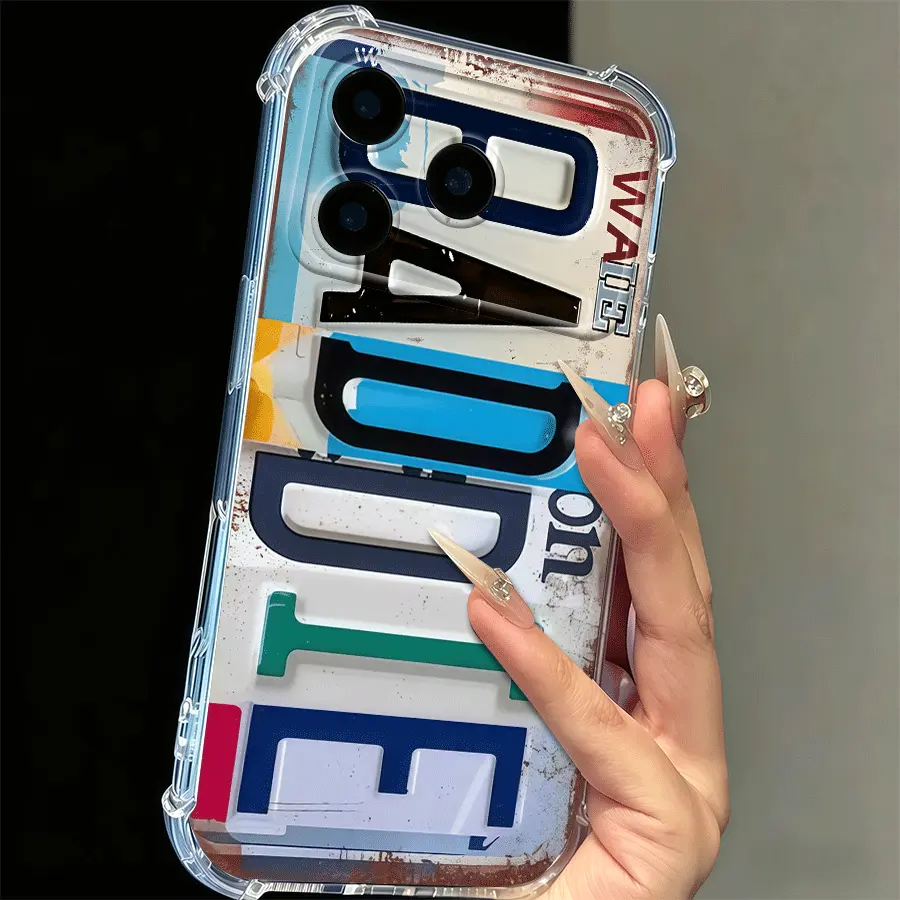
Distressed Color Block Baddie Phone Case
iPhone 16 Pro · Transparent · observed $9.90 USDOpen the selected option, check your model, and choose a purchase route without a store sign-up step.
View this exact option →
Vintage Silver Boombox Phone Case
iPhone 16 Pro · Transparent · observed $9.90 USDBrowse this alternative design on CasePop. Confirm the live option and total before payment.
View this exact option →Unchanged CasePop catalog photos. Camera openings can differ by model; check the exact selector option.
Payment verification is not store registration
After checking delivery details, continue to the payment step and use an available payment method. CasePop currently offers card checkout through Stripe. A payment provider may require authentication or other verification for the payment you choose. A prompt on that provider page does not mean you missed a CasePop registration step.
Follow the options displayed by the payment provider and review the final amount before confirming. This guide does not promise that every card or payment attempt will be accepted. If you have already started a payment and its result is unclear, check the existing checkout status before starting another attempt. Returning to the store, entering an address or seeing a payment screen is not the same as a confirmed paid order.
You can check an order without remembering a password
The Track your order page uses email verification rather than a store-account password. Its current U.S. form accepts the checkout email or U.S. phone number and explains that a one-time code and secure link are sent to the order email. You still need access to that inbox. The verification protects order information; it is not an invitation to create a new store account.
Keep the confirmation and any order reference available after purchase. If you cannot access the order inbox or cannot establish the payment result, use Customer Care with the reference you have. Do not send card numbers, security codes or your email verification code to someone claiming to help. A tracking request is also separate from placing a second order: avoid reordering simply because the first confirmation is taking time to find.
Quick answers
Do I need a CasePop password before I buy?
No. The current website purchase flow asks for the selected items, delivery details and payment, without a CasePop account sign-up step.
Can I leave the reminders and design-updates checkbox unchecked?
Yes. That checkbox is optional. The checkout email is still needed as the contact address for the order.
Can I track an order without a store login?
Yes. Track your order uses verification sent to the order email. Use the checkout email or the supported U.S. phone-number option and follow the page instructions.
Choose a case, then check your details
Use either exact product link above to begin. Before payment, confirm the model, quantity, delivery address, accessible email and final amount.
Track your order · Customer Care · Shipping information
Website flow and catalog options reviewed October 26, 2026. This guide does not confirm an individual payment.