CASEPOP JOURNAL / MODEL CHECK
Same Photo, Different Phone: Recheck the Camera Area Before Ordering
Custom phone case · $35 at publication
Check your model in DIY Studio →
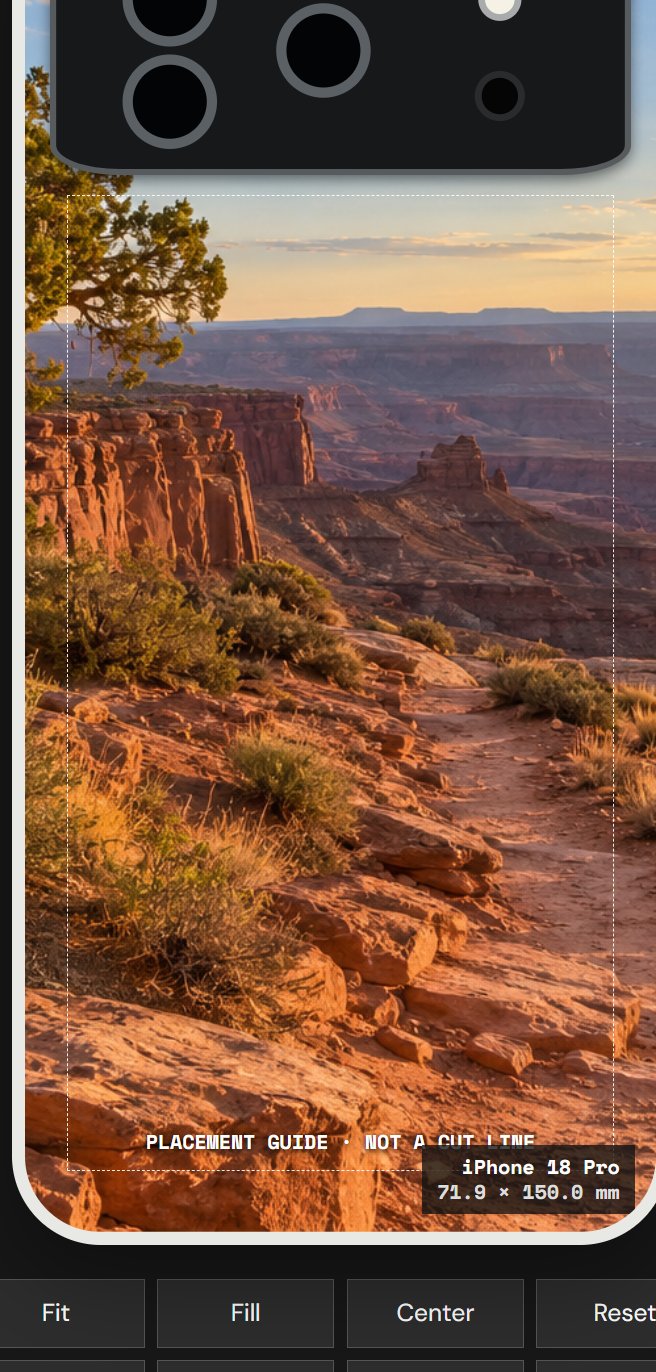
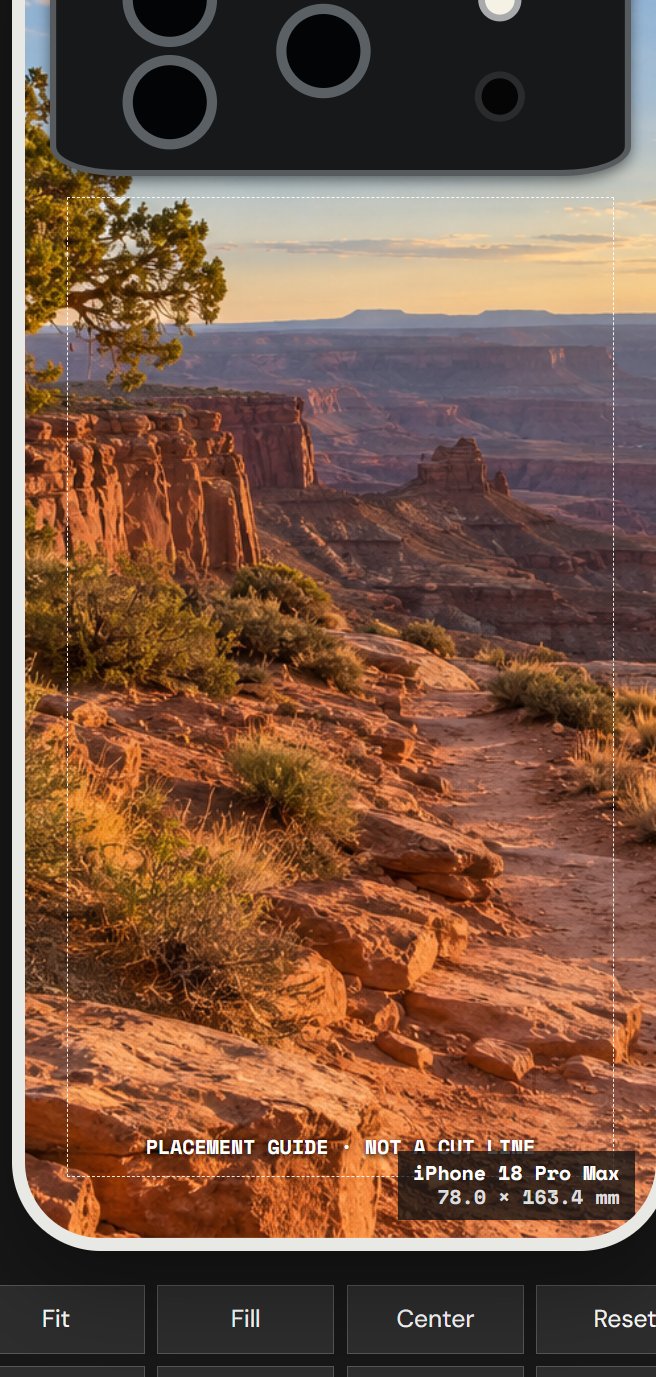
The short answer: no—do not assume that one photo keeps the same crop when you switch phone models. Choose the exact model first, upload the same original file, and inspect the camera area and every edge again. The CasePop previews above hold the file, material and placement setting constant; only the selected phone model changes.
This check matters most when a photograph has one important detail near the upper-left corner. In our fictional desert example, the curved juniper is the visual anchor. It also sits close to the camera area. A composition can look balanced on one phone and feel tighter on another even when the source image and editing controls have not changed.
The two case images are actual screenshots from the CasePop live editor using Clear Hard Polycarbonate Case, Manual Adjust and Fill. They are not printed-product photographs, customer orders or same-scale physical measurements. The editor itself says the camera overlays are approximate placement guides and that the final print layout is checked against the matching production shell.
Start with the full phone-model name
“iPhone 18” is not enough information for this decision. In the live selector, iPhone 18 Pro and iPhone 18 Pro Max are separate choices. Their displayed preview-body dimensions are also different: 71.9 × 150.0 mm for iPhone 18 Pro and 78.0 × 163.4 mm for iPhone 18 Pro Max. Those numbers describe the editor preview body; they are not a promise that the screenshot is a factory dieline.
Confirm the model in the phone settings or on the original purchase record before designing. Do not pick the closest-looking name to unlock the editor. A case is made for a specific device shape, and a pleasant preview for the wrong phone is not a useful buying result. If the exact model is missing from your preferred material, check another listed material or contact the studio before ordering.
Use one source file for a fair comparison
When you compare models, change only the model. Keep the source file, case material, arrangement mode, Fit or Fill choice, zoom, rotation and position the same. That makes the model change visible instead of mixing it with a second crop decision. Our comparison uses the same wide desert image for both previews and leaves the juniper near the upper-left.
Use the original PNG, JPG or WebP rather than a screenshot of the first phone preview. A screenshot can capture the first model label, camera guide and editing controls as if they were part of the artwork. The current studio accepts one image up to 12 MB for each design and recommends an original photo with at least 1500 pixels on the shortest side.
Fit first, then decide whether Fill helps
Fit is the clearest first diagnostic for a landscape photo because it keeps the whole image visible. It may leave open space on a tall phone case, but it shows whether the subject, horizon and important edges all exist in the uploaded file. If the composition works, compare Fill to see how much extra coverage you gain and what gets cropped.
Fill covers the case area more fully, so the wide source must lose part of its sides. In our screenshots, the trail remains a strong center line while the tree moves close to the left edge and camera guide. That does not mean the tree will be cut exactly along the black overlay. It means the upper-left detail deserves more breathing room before the design is saved.
If moving the image protects the tree but removes the trail, go back to the source and make a second crop with more space around the tree. A source-image decision is often cleaner than a last-minute zoom adjustment. Keep the untouched original so you can compare both versions without losing the full photograph.
Treat the camera overlay as a warning area
The dark camera shape and dashed placement guide help you judge risk. They are not literal cutting instructions for a factory or a guarantee of the final visible boundary. Keep faces, pet eyes, initials, signatures and other irreplaceable details comfortably outside that area. A patch of sky or background texture is safer near the camera than the only recognizable subject.
Check all four outer edges too. A design can clear the camera and still crop a hand, a flower, a landmark or a line of text at the bottom. View the preview at normal phone size instead of judging only while zoomed in. If a detail is barely visible in the editor, assume that it needs a clearer position rather than relying on a precise edge prediction.
What this comparison proves—and what it does not
It proves that the CasePop studio currently lists both iPhone 18 Pro and iPhone 18 Pro Max, displays separate preview-body dimensions, accepts the same uploaded source for each, and lets you review placement before adding anything to the bag. It also proves that the current phone DIY price shown in the studio is $35.
It does not prove exact printed color, a material feel, camera-cut geometry, drop protection, charging compatibility or the appearance of unprinted areas. The selected Clear Hard Polycarbonate Case is one live material option; Clear Flexible TPU Case is another option visible at publication. Read the current material description and ask a production question before payment if a physical detail matters.
Review the design you are actually buying
Before checkout, confirm the CasePop brand, material, full phone-model name, artwork preview, quantity and $35 line price. A saved design for one model should not be treated as a design for another model. If you need two different phones, create and review each design separately instead of increasing the quantity of one line.
Use the live shipping and returns pages for the current order terms. No order, payment or customer message was created for this guide. The demonstration stops at the editable preview because that is the point where the crop and camera-area decision can be checked safely.
A model-switch checklist
- Confirm the complete phone-model name.
- Keep one original source file for both previews.
- Hold material, placement mode, zoom and rotation constant.
- Start with Fit, then compare Fill if you want more coverage.
- Keep the main subject away from the camera guide and outer edges.
- Treat the guide as approximate, not as a factory cut line.
- Review model, material, preview, quantity and price before paying.
Open CasePop DIY Studio and check your exact phone model →
Questions before you start
Will the same photo crop exactly the same on iPhone 18 Pro and iPhone 18 Pro Max?Do not assume it will. Select each exact model and review its live preview because the body proportions and camera area can change the usable composition.
Is the black camera overlay an exact factory cut template?No. The CasePop editor describes its camera overlay and dashed safe zone as approximate placement guides. The production team checks the final layout against the matching shell.
Should I use Fit or Fill for a landscape photo?Start with Fit when you want to see the whole source image, then compare Fill if you want more case coverage. Fill may crop the sides, so keep the subject away from the camera area and outer edges.
How much is the custom phone case shown in these previews?The CasePop studio showed $35 for a custom phone case when this guide was published. Check the live editor and order summary before paying because options can change.